


Umo Mobility
4.51.56K Reviews
App Specs
- Version
- 6.9.0.2184
- Updated On
- License
- Free
- Downloads
- 500,000+
- Developer
- Delerrok
- Categories
- Travel & Local
- Platform
- Android
Screenshots
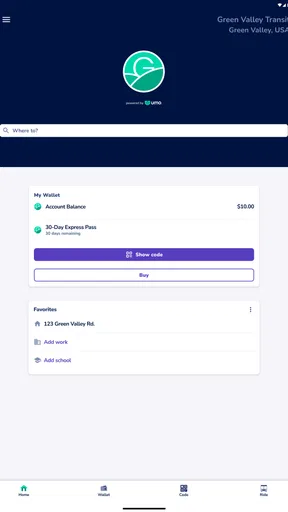
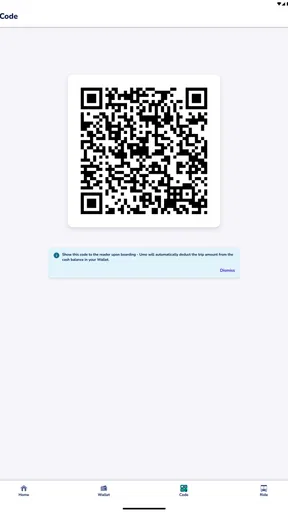
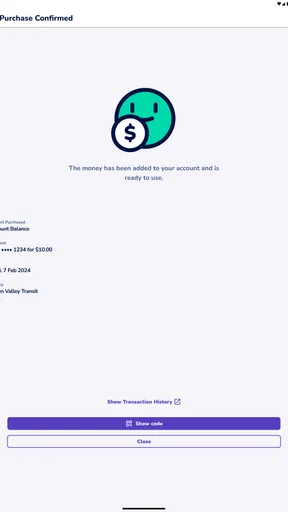
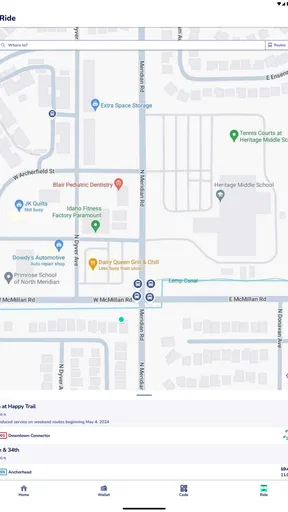
 Analysis by AppCompare
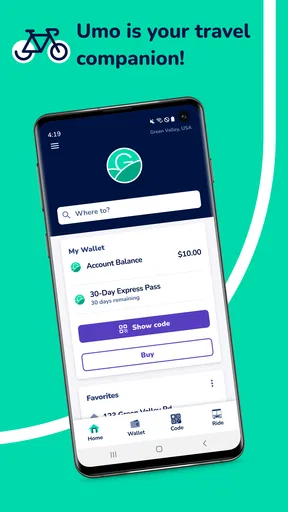
When I need help getting around by public transport, I want something more practical than a map covered with unrelated options. Umo Mobility is built for that everyday need: it is a free travel and local app from Delerrok that brings transport information into one place. I found its strongest appeal in situations where I already know I want to use transit but need a clearer way to plan the trip and manage the journey.
The app is listed for everyone, which makes it approachable for families, occasional riders, and people who are still learning a local network. It has also attracted more than 500 thousand installs, with an average score of 4.5 from around 5.5 thousand ratings. Those figures suggest that the basic idea works for a broad group of riders, although popularity alone does not guarantee that it will suit every city or every travel style.
How Umo Mobility fits into everyday travel
I see this as a focused companion for local transportation rather than a complete replacement for every travel tool on a phone. Its place in the Travel & Local category is important: the experience is most useful when the journey depends on buses or other supported public transport services, not when I am comparing flights, booking hotels, or looking for a general-purpose driving route.
That distinction helps set expectations. A general map app is often better when I want restaurants, walking directions, live traffic, cycling paths, and businesses along the way. Umo Mobility makes more sense when the transport network itself is the main subject. Instead of treating transit as just one layer among many, it gives the journey more attention.
In a normal weekday scenario, I might leave work later than expected and need to reach a station or neighborhood without guessing which departure is still realistic. I would use the app to check the available transit option, compare the timing with my plans, and keep it open while moving through the trip. That is a modest use case, but it is exactly where a dedicated mobility app can save mental effort.
The free price is one of the clearest parts of the value proposition. I can try it without paying an upfront purchase price, which makes experimentation easy. Someone new to a transit system does not have to commit money before finding out whether the local service is useful. At the same time, free access should not be confused with a promise that every possible transit feature or every local network will be available in the same way everywhere.
That is the practical question I would answer before relying on it: does Umo Mobility support the transport service I actually use? The app’s usefulness is tied to local coverage and the quality of the information available for that service. If my city or operator is not properly represented, its attractive price does not compensate for the gap. I would check the relevant local availability before making it my only travel tool.
Worth Reading Before You Choose

EA SPORTS FC Mobile 26 Is a Bigger Football Game, but It Takes Time

Flipboard Shows What News Apps Must Do Beyond the Feed

Switching to Android Auto Means Rethinking Your Driving Routine

Google Calendar Makes a Crowded Week Easier to Manage

Ludo King Makes the Most of the Minutes Between Plans

Baby Panda World Brings Quick Play to Modern Phones, but Its Game Library Feels Busy
What I like about the free approach
Free access lowers the risk for occasional riders. I can keep the app available for unfamiliar trips, visitors, appointments, or days when driving is inconvenient, without treating it as another subscription decision. That matters because travel apps are often used irregularly: a person may need them intensely for one week and barely open them the next.
It also makes the app easier to recommend to someone who has just moved to a new area. Rather than explaining several separate tools, I can suggest trying one transit-focused option first and judging it against the local network. The absence of an upfront charge means the decision can be based on usability instead of price.
There is a subtle benefit here for households as well. A family member who rarely rides public transport can install it for a specific outing and decide later whether it deserves a permanent place on the phone. I would still avoid promising that it will replace all other navigation tools, but the free entry point makes it a sensible first experiment.
Where the value comes from in practice
The real value is not simply having another map. It comes from reducing the number of small decisions involved in a transit trip. Which service should I consider? How much waiting is acceptable? Is the route still workable if I miss one departure? A dedicated mobility app can make those questions easier to handle than a general map interface that treats transit as one of many route types.
For a regular rider, the benefit is cumulative. A single saved minute is not impressive, but avoiding repeated uncertainty across a week can make commuting feel less fragile. I especially appreciate this kind of tool on unfamiliar routes, where I know the destination but not the order of stops, transfer points, or the best way to connect the parts of the journey.
For an occasional rider, the value is different. The app is useful as a confidence aid. I do not need to memorize the network or understand every route name before starting. I can approach the trip with a plan instead of relying entirely on signs, guesses, or asking another passenger.
One non-obvious advantage of using a dedicated transit app is that I can separate planning from the rest of my phone activity. When I use a general map, it is tempting to keep changing the destination, switching transport modes, or checking nearby places. A focused tool encourages me to think in terms of the actual ride. That narrower purpose can be a strength when I am already in a hurry.
Useful habits that make the app more dependable
I would not wait until I am standing at a stop with a low battery and no time to think before learning the interface. My preferred workflow is to check the trip earlier, note the important departure or connection, and then reopen the app close to leaving. This gives me a chance to notice whether the journey depends on a tight transfer or an unfamiliar part of the network.
For a recurring commute, I would also compare the app’s suggested option with the route I normally take for several days instead of changing everything immediately. A theoretically efficient route may be less comfortable if it involves a difficult transfer, a long walk, or little flexibility when the first vehicle is late. The best route is not always the one with the shortest displayed duration.
Another useful habit is keeping a second source available for unusual trips. I would use Umo Mobility as the transit-focused reference, then use a general map for the walking approach, nearby landmarks, or the final part of the journey after leaving the network. This two-tool method is not a criticism; it reflects the fact that specialized apps and broad navigation apps solve different problems.
I also recommend treating displayed travel information as a plan rather than a guarantee. Public transport can change because of congestion, crowding, service interruptions, or circumstances outside the app. If I have an appointment that cannot be missed, I build in extra time and check the journey again before leaving. That is a sensible discipline with any transit planner.
Tradeoffs I noticed before making it my main option
The first tradeoff is specialization. A focused mobility app can be easier to understand for transit planning, but it may not provide the broad discovery experience of a general map. If I want to find a café, inspect a walking route in detail, compare driving and cycling, and then switch to transit, a larger mapping service may be more convenient.
The second is local dependence. A transit app can only be as useful as the network information connected to the service I am trying to use. This means two people can have very different experiences even though they install the same application. One rider may find it central to daily travel, while another may discover that the local coverage does not match their needs closely enough.
The third tradeoff is that a free app still has a cost in attention. I need to learn where to look, understand how it presents a journey, and develop a habit of checking the right details. That learning curve should be small, but it exists. For someone who rides public transport only once every few years, opening a familiar general map may feel faster.
I would also avoid using it as my sole source of reassurance on a complicated trip. When a route includes several connections, an event crowd, or an unfamiliar area late at night, I prefer to verify the important stages independently and allow more time. The app can support the decision without removing the need for ordinary travel judgment.
Device compatibility is reasonably broad because the current version is 6.9.0.2184 and the minimum operating system is Android 7.0. That makes it accessible to people who are not using a recent Android phone. Still, anyone with an older device should check that the phone can run the current release comfortably before depending on it for regular travel.
Who will get the most from it
Umo Mobility is a good fit for daily bus riders, students, commuters, and people who use public transport often enough to value a dedicated planning space. It is also well suited to someone who has recently moved and is trying to understand the local network without immediately becoming an expert in route names and connections.
I would recommend it to travelers who prefer a simple, transit-centered workflow and do not want to pay just to test a mobility tool. The free access is particularly useful for occasional journeys, where a paid alternative would be difficult to justify. It is also a practical option for families or groups who need a common reference while moving around a city.
Visitors can benefit from it too, but I would be more cautious here. A visitor should first confirm that the destination’s transport service is supported and should not assume that familiarity from one city transfers perfectly to another. The app may be most valuable when the local network is represented clearly and the traveler has enough time to check the route before setting out.
On the other hand, I would skip it as a primary tool if my travel is mostly by car, walking, cycling, air travel, or long-distance rail. In those cases, a broader navigation or booking app may cover more of what I actually need. I would also look elsewhere if I require a single application to combine detailed place discovery, multiple travel modes, and general trip organization.
People who dislike checking travel details before leaving may not get much value from it either. No mobility app can turn an unfamiliar journey into a completely automatic experience. The best results come from riders willing to review the route, notice connections, and adapt when the day does not follow the plan.
My verdict on the value
After weighing the free access against the local and functional tradeoffs, I think Umo Mobility is worth trying for anyone whose routine includes supported public transportation. There is no purchase decision to defend, so the sensible approach is practical: install it, test it with a real trip, and see whether its view of the network is more useful than the alternatives already on the phone.
Its strongest case is not that it replaces every travel app. Its case is that a dedicated transit companion can make public transport feel more manageable, especially when I am commuting, exploring an unfamiliar route, or helping someone else plan a ride. The app’s 4.5 average across roughly 5.5 thousand ratings gives it encouraging user feedback, while the free model keeps the trial barrier low.
Delerrok has positioned the app around a clear everyday problem rather than an expensive travel package. I value that restraint. I would keep a general map installed alongside it for walking, places, and broader route comparisons, but I would choose Umo Mobility when the transit portion is the part that needs the most attention.
My recommendation is simple: try it if public transport is part of your real routine, but judge it by the local network you use rather than by the app’s name alone. For the right rider, it is a useful and accessible travel companion. For someone seeking an all-purpose navigation suite or a tool for non-transit travel, another option will probably deliver better value, even though this app itself is free.
Pros
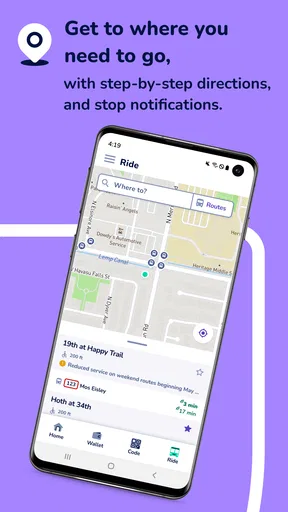
- Real-time bus tracking helps reduce uncertainty at stops.
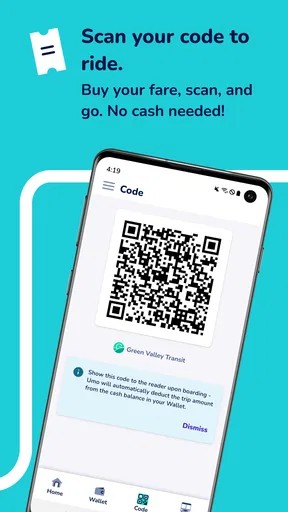
- Mobile ticketing can make boarding faster and more convenient.
- Route planning combines schedules
- stops
- and nearby transit options.
- Service alerts help users react to delays
- detours
- and cancellations.
- Useful for comparing transport options before starting a journey.
Cons
- Coverage and features depend heavily on the local transit agency.
- GPS positions may occasionally lag behind a vehicle’s actual location.
- Ticket availability and payment methods can vary by participating operator.
- Some routes may show limited schedule or disruption information.
- The app may require location access for its most useful features.
FAQs for Umo Mobility
What is Umo Mobility and what can I use it for?
Umo Mobility is a public transportation app designed to help riders plan and manage trips using participating buses, trains, and other transit services. Depending on your local transit agency, you may be able to search routes, view schedules, check arrival information, purchase or activate fares, and access service updates. Available tools can vary by city, so verify that your local operator is supported before downloading.
Can I buy and use public transit tickets through Umo Mobility?
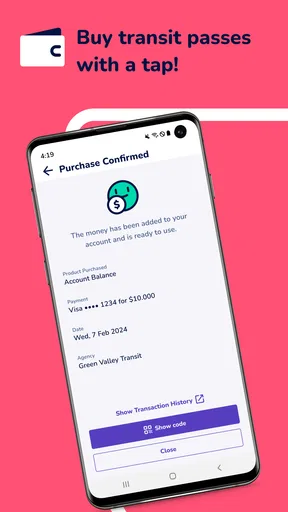
In supported areas, Umo Mobility allows users to purchase transit passes or individual fares directly in the app. You may need to create an account, select your transit agency, add a payment method, and activate a ticket before boarding. Ticket types, prices, expiration rules, and accepted payment options differ between agencies. Always check the ticket instructions and make sure your pass is active when required.
Does Umo Mobility work in every city or with every transit system?
No. Umo Mobility is available only through participating transportation agencies and its features depend on the region you select. Some locations may support trip planning and real-time arrivals, while others may primarily offer mobile ticketing or account management. Before relying on the app for a journey, search for your city or transit provider and confirm that the routes and services you need are listed.
Do I need an internet connection or location access to use Umo Mobility?
An internet connection is generally recommended for signing in, purchasing fares, receiving service updates, loading current schedules, and viewing real-time vehicle information. Location permission may help the app identify nearby stops or improve trip planning, but its necessity can depend on the feature and device settings. Downloaded or already activated tickets may have specific offline rules, so check your agency’s guidance before traveling.
Is Umo Mobility free to download, and what should I know about payments and privacy?
Umo Mobility is typically free to download, although you must still pay the applicable transit fare when purchasing tickets or passes. Payment processing, refunds, account requirements, and supported cards can vary by transportation provider. The app may request personal information and permissions related to accounts, payments, location, or notifications. Review the privacy policy and app permissions, and download only from the official Google Play or Apple App Store listing.


